This is the full developer documentation for Medjed AI
# Welcome to Medjed AI
> Comprehensive documentation for medjed.ai services, the affordable AI infrastructure platform.
## What is medjed.ai?
[Section titled “What is medjed.ai?”](#what-is-medjedai)
medjed.ai is a marketplace for affordable AI infrastructure, making it easy for anyone to:
* Spin up AI instances in seconds at competitive prices
* Scale across thousands of GPUs from secure cloud datacenters
* Launch prebuilt or custom templates with one click
* Access state-of-the-art AI hardware without the upfront costs
## How It Works
[Section titled “How It Works”](#how-it-works)
medjed.ai connects compute providers — from professional datacenters to specialized AI infrastructure companies — with users who need AI compute resources. Our platform lets you:
* Search and filter by GPU type, RAM, CPU, bandwidth, and more
* Compare prices from multiple providers in real-time
* Launch instances with pre-configured AI frameworks
* Monitor and manage your instances through a simple dashboard
## Key Features
[Section titled “Key Features”](#key-features)
### Affordable Pricing
[Section titled “Affordable Pricing”](#affordable-pricing)
Get access to premium AI hardware at a fraction of the cost of traditional cloud providers.
### Instant Deployment
[Section titled “Instant Deployment”](#instant-deployment)
Spin up AI instances in seconds with our intuitive interface and prebuilt templates.
### Flexible Options
[Section titled “Flexible Options”](#flexible-options)
Choose from a wide range of GPU types, from consumer GPUs to enterprise-grade hardware.
### Scalable Infrastructure
[Section titled “Scalable Infrastructure”](#scalable-infrastructure)
Easily scale your compute resources up or down based on your needs.
### Secure Environment
[Section titled “Secure Environment”](#secure-environment)
All instances run in isolated environments with enterprise-grade security measures.
### Prebuilt Templates
[Section titled “Prebuilt Templates”](#prebuilt-templates)
Access popular AI frameworks like TensorFlow, PyTorch, and Hugging Face with one click.
## Get Started
[Section titled “Get Started”](#get-started)
### Quickstart Guide
[Section titled “Quickstart Guide”](#quickstart-guide)
Launch your first AI instance in minutes with our step-by-step guide.
### GPU Instances
[Section titled “GPU Instances”](#gpu-instances)
Browse our available GPU instances and choose the perfect configuration for your needs.
### Common Tasks
[Section titled “Common Tasks”](#common-tasks)
Learn how to perform common tasks like setting up SSH access, installing custom software, and monitoring your instances.
## Our Mission
[Section titled “Our Mission”](#our-mission)
medjed.ai’s mission is to democratize access to AI infrastructure. We believe that the power of artificial intelligence should be available to everyone, not just large corporations with deep pockets. By connecting users with affordable compute resources, we aim to accelerate innovation and make AI development more inclusive.
## Talk to Us
[Section titled “Talk to Us”](#talk-to-us)
Need help or have questions? We’re here to assist you:
* **Support Chat** → Available 24/7 in the bottom-right corner of our console
* **Email** →
* **Discord** → Join our community for help and discussions
# Bare Metal GPUs
> An overview of bare metal GPUs, their advantages, and use cases compared to cloud GPUs
# What are Bare Metal GPUs?
[Section titled “What are Bare Metal GPUs?”](#what-are-bare-metal-gpus)
A bare metal GPU is a dedicated graphics processing unit that provides direct access to underlying hardware resources without virtualization or abstraction layers. Unlike shared cloud GPU instances, bare metal GPUs give users complete control over hardware configuration, CUDA drivers, and memory management.
## Bare Metal vs Cloud GPUs
[Section titled “Bare Metal vs Cloud GPUs”](#bare-metal-vs-cloud-gpus)
| Aspect | Bare Metal GPUs | Cloud GPUs |
| ------------------- | ------------------------------------------------------------- | ------------------------------------------------------- |
| **Hardware Access** | Direct, no virtualization | Virtualized through hypervisor |
| **Performance** | Consistent, no overhead | Variable due to virtualization and noisy neighbors |
| **Control** | Full control over hardware, drivers, and memory | Limited control, managed by cloud provider |
| **Scalability** | Fixed resources, requires manual scaling | Elastic, quick to deploy/terminate |
| **Cost Model** | Upfront investment, lower long-term cost for steady workloads | Pay-as-you-go, higher long-term cost for continuous use |
## Key Benefits
[Section titled “Key Benefits”](#key-benefits)
* **Eliminated Virtualization Overhead**: Direct hardware access ensures maximum performance for GPU-intensive workloads
* **Consistent Performance**: No noisy neighbor effects from shared resources
* **Precise Optimization**: Ability to customize CUDA configurations, kernel development, and system parameters
* **Data Sovereignty**: Ideal for organizations with strict compliance requirements needing direct hardware control
## Ideal Use Cases
[Section titled “Ideal Use Cases”](#ideal-use-cases)
* Large-scale model training requiring minimal latency between GPUs
* High-throughput inference serving with strict latency requirements
* Workloads requiring specialized CUDA optimizations or custom GPU kernels
* Applications with consistent, high-demand AI/ML workloads
* Industries with strict data compliance needs (e.g., financial fraud detection)
## Configuration Options
[Section titled “Configuration Options”](#configuration-options)
* **Dedicated Bare Metal**: Full root access and hardware control for custom implementations
* **Managed Bare Metal**: System administration offloaded while maintaining dedicated hardware access, typically using containerization for workload isolation
Bare metal GPUs offer raw compute power and consistent performance, making them a preferred choice for enterprises with demanding AI workloads or strict data requirements, while cloud GPUs remain valuable for flexible, scalable development environments.
# Bare Metal GPUs Features
> Detailed features and specifications of our bare metal GPU servers
# Bare Metal GPUs Features
[Section titled “Bare Metal GPUs Features”](#bare-metal-gpus-features)
Our bare metal GPU servers are dedicated, single-tenant servers with 8 GPUs of various models that can operate standalone or in multi-node clusters. They provide raw compute power and consistent performance for AI/ML workloads, high-performance computing (HPC), and other GPU-intensive applications.
## Hardware Specifications
[Section titled “Hardware Specifications”](#hardware-specifications)
### RTX Pro 6000 Bare Metal Server
[Section titled “RTX Pro 6000 Bare Metal Server”](#rtx-pro-6000-bare-metal-server)
| Component | Description | Quantity |
| ------------------------- | --------------------------------------------------- | -------- |
| **GPU Module** | NVIDIA RTX Pro 6000 Blackwell Server Edition | 8 |
| **CPU** | AMD EPYC 9475F | 2 |
| **CPU Cores/Threads** | 128 cores / 256 threads | - |
| **Memory** | 64GB DDR5 ECC (3200 MHz) | 24 |
| **Total Memory** | 1.5 TB DDR5 ECC | - |
| **Storage** | - System: NVMe SSD 1.92 TB - Data: NVMe SSD 3.84 TB | - - |
| **Storage Configuration** | - System: RAID 1 - Data: RAID 5 | - - |
| **Network Card** | CX6 100G | 1 |
| **Power Supply** | Redundant 1600W | 2 |
| **Form Factor** | 4U Rackmount | 1 |
### NVIDIA H100 DGX Bare Metal Server
[Section titled “NVIDIA H100 DGX Bare Metal Server”](#nvidia-h100-dgx-bare-metal-server)
| Component | Description | Quantity |
| ------------------------- | ----------------------------------------------------------------- | -------- |
| **GPU Module** | NVIDIA H100 Tensor Core GPU (80 GB HBM3 per GPU) | 8 |
| **GPU Interconnect** | NVIDIA NVLink technology | - |
| **CPU** | Intel Xeon Scalable Processor (SPR) 8558 | 2 |
| **vCPUs** | 128 cores | - |
| **Memory** | 64GB DDR5 ECC (4800 MHz) | 32 |
| **Total Memory** | 2 TB DDR5 ECC | - |
| **Storage** | NVMe SSD | 10 TB |
| **Storage Configuration** | RAID 0/1 configurable | - |
| **Network Card** | - Mellanox ConnectX-7 (400 Gbps) - InfiniBand: 100G (2 × 50 Gbps) | - - |
| **Public Network** | 10 Gbps | - |
| **Form Factor** | 4U Rackmount | 1 |
### H200-HGX-SpectrumX Bare Metal Server
[Section titled “H200-HGX-SpectrumX Bare Metal Server”](#h200-hgx-spectrumx-bare-metal-server)
| Component | Description | Quantity |
| ------------------------- | ----------------------------------------------------------------------- | -------- |
| **GPU Module** | NVIDIA H200 SXM | 8 |
| **GPU Interconnect** | NVIDIA NVLink technology | - |
| **CPU** | Dual Xeon SPR 8460Y+ | 2 |
| **CPU Cores** | 80 cores (2.00 - 3.70 GHz) | - |
| **Memory** | 64GB DDR5 ECC RDIMM | 32 |
| **Total Memory** | 2 TB DDR5 ECC | - |
| **Storage** | - OS area: 439 GB NVMe - Home area: 880 GB NVMe - Data area: 14 TB NVMe | - - - |
| **Storage Configuration** | - OS: RAID 1 - Home: No RAID - Data: RAID 0 | - - - |
| **Network Card** | - Bandwidth: Shared - IP: Shared (no public IP included) | - |
| **Data Center** | Japan | - |
| **Form Factor** | 4U Rackmount | 1 |
### RTX 5090 Founders Edition Bare Metal Server
[Section titled “RTX 5090 Founders Edition Bare Metal Server”](#rtx-5090-founders-edition-bare-metal-server)
| Component | Description | Quantity |
| --------------------- | -------------------------------------------------------------------------- | -------- |
| **GPU Module** | NVIDIA RTX 5090 Founders Edition (32 GB GDDR7 per GPU) | 8 |
| **CPU** | Intel Xeon Platinum 8481C | 1 |
| **CPU Cores/Threads** | 56 cores / 112 threads | - |
| **Memory** | 64GB DDR5-4800 RDIMM ECC | 8 |
| **Total Memory** | 512 GB DDR5 ECC | - |
| **Storage** | - System: 1 TB M.2 Gen4 NVMe SSD - Data: 7.68 TB U.2 Gen4 NVMe SSD (DWPD1) | - - |
| **Form Factor** | 2U Rackmount | 1 |
### RTX 4090 Bare Metal Server
[Section titled “RTX 4090 Bare Metal Server”](#rtx-4090-bare-metal-server)
| Component | Description | Quantity |
| ---------------- | -------------------------- | -------- |
| **GPU Module** | NVIDIA RTX 4090 24G | 8 |
| **CPU** | Intel Xeon Platinum 8457C | 2 |
| **CPU Cores** | 48 cores × 2 (2.6-3.1 GHz) | - |
| **Memory** | 48GB DDR5 | 16 |
| **Total Memory** | 768 GB DDR5 | - |
| **Storage** | Data: 7.68 TB NVMe SSD | 2 |
| **Form Factor** | 4U Rackmount | 1 |
## Networking
[Section titled “Networking”](#networking)
Our bare metal GPU servers come with the following network configurations:
| Network Type | Details |
| -------------------- | --------------------------------------------------------------------------------------------------------------------------- |
| **Public Network** | - Bandwidth: Shared - IP Address: Shared (1:1 NAT available as add-on) - Max Speed: Up to 10 Gbps (varies by configuration) |
| **Private Network** | - Bandwidth: Shared - IP Address: Private IP assigned per server - Layer 2 Isolation: Yes |
| **GPU Interconnect** | - RTX Pro 6000: PCIe 5.0 - H100: NVIDIA NVLink + InfiniBand - RTX 5090: PCIe 5.0 |
| **Network Cards** | - RTX Pro 6000: CX6 100G - H100: ConnectX-7 (400 Gbps) + InfiniBand 100G - RTX 5090: 10Gbps Ethernet |
## Software Configuration
[Section titled “Software Configuration”](#software-configuration)
All our bare metal GPU servers come preconfigured with the following software options:
| Software | Details |
| --------------------- | ---------------------------------------------------------------------------------------------------------------------------------------------------------- |
| **Operating System** | Ubuntu 22.04 LTS (other OS available upon request) |
| **Remote Access** | - SSH with preloaded keys - IPMI for out-of-band management |
| **GPU Drivers** | - NVIDIA CUDA drivers (preinstalled) - NVIDIA cuDNN (preinstalled) - NVIDIA TensorRT (preinstalled) - Support for custom driver versions (limited support) |
| **Container Support** | - Docker preinstalled - NVIDIA Container Toolkit preinstalled - Support for Kubernetes deployment |
| **Monitoring** | - Basic server monitoring - GPU utilization metrics - Temperature and power monitoring |
## Deployment Options
[Section titled “Deployment Options”](#deployment-options)
| Option | Details |
| ------------------------ | ------------------------------------------------------------------- |
| **Standalone Server** | Single server deployment with 8 GPUs |
| **Multi-node Cluster** | Deploy multiple servers in a cluster with high-speed interconnect |
| **Custom Configuration** | Tailored hardware and software configuration available upon request |
| **Provisioning Time** | Typically 24-48 hours for standard configurations |
## Support and Maintenance
[Section titled “Support and Maintenance”](#support-and-maintenance)
| Service | Details |
| ------------------------ | -------------------------------------------------------- |
| **Technical Support** | 24/7 support via email and Discord |
| **Hardware Replacement** | 4-hour hardware replacement SLA (99.9% uptime guarantee) |
| **Software Updates** | Regular security patches and driver updates |
| **Maintenance Windows** | Scheduled maintenance with prior notification |
| **Documentation** | Comprehensive API and usage documentation |
| **Training** | Optional onboarding and training sessions |
## Use Cases
[Section titled “Use Cases”](#use-cases)
Our bare metal GPU servers are ideal for a wide range of GPU-intensive workloads:
### AI/ML and Deep Learning
[Section titled “AI/ML and Deep Learning”](#aiml-and-deep-learning)
* Large language model (LLM) training and fine-tuning
* Computer vision and image recognition
* Natural language processing (NLP)
* Generative AI applications
* Reinforcement learning
### High-Performance Computing (HPC)
[Section titled “High-Performance Computing (HPC)”](#high-performance-computing-hpc)
* Scientific simulations
* Computational fluid dynamics (CFD)
* Molecular dynamics
* Weather forecasting
### Media and Entertainment
[Section titled “Media and Entertainment”](#media-and-entertainment)
* 3D rendering and animation
* Video editing and post-production
* Visual effects (VFX)
* Gaming and virtual reality (VR) development
### Enterprise Applications
[Section titled “Enterprise Applications”](#enterprise-applications)
* Computer-aided design (CAD)
* Product lifecycle management (PLM)
* Financial modeling and risk analysis
* Real-time fraud detection
## Security
[Section titled “Security”](#security)
| Feature | Details |
| --------------------- | ------------------------------------------------------------------------------------------------ |
| **Physical Security** | - 24/7 data center surveillance - Biometric access controls - Redundant power and cooling |
| **Network Security** | - DDoS protection - Firewall configuration options - Private network isolation |
| **Data Security** | - Encryption at rest (optional) - Encryption in transit - Secure data erasure on decommissioning |
| **Compliance** | - ISO 27001 certified data centers - GDPR compliant - SOC 2 Type II certified |
## Advantages of Bare Metal GPUs
[Section titled “Advantages of Bare Metal GPUs”](#advantages-of-bare-metal-gpus)
| Advantage | Description |
| ------------------------------------ | --------------------------------------------------- |
| **No Virtualization Overhead** | Direct hardware access ensures maximum performance |
| **Consistent Performance** | No noisy neighbor effects from shared resources |
| **Customizable Configuration** | Tailor hardware and software to your specific needs |
| **High GPU-to-GPU Bandwidth** | Optimized for multi-GPU workloads |
| **Data Sovereignty** | Full control over your data and infrastructure |
| **Cost-Effective for Long-Term Use** | Lower total cost of ownership for steady workloads |
## Getting Started
[Section titled “Getting Started”](#getting-started)
1. **Choose Your Configuration**: Select the GPU model and lease term that best fits your needs
2. **Provision Your Server**: Your server will be provisioned within 24-48 hours
3. **Access Your Server**: Connect via SSH using the provided credentials
4. **Install Your Workloads**: Deploy your AI/ML models or applications
5. **Scale as Needed**: Add more servers or upgrade your configuration as your needs grow
For more information about our bare metal GPU servers, please refer to our [pricing page](pricing) or [contact our sales team](pricing#contact-sales).
# Bare Metal GPUs Pricing
> Detailed pricing information for bare metal GPU server configurations
# Bare Metal GPUs Pricing
[Section titled “Bare Metal GPUs Pricing”](#bare-metal-gpus-pricing)
This document provides comprehensive pricing information for our bare metal GPU server configurations. We offer flexible lease terms and multiple GPU models to meet your AI/ML workload requirements.
## Pricing Overview
[Section titled “Pricing Overview”](#pricing-overview)
Our bare metal GPU servers are available with 1-month, 6-month, and 12-month lease terms, with volume discounts for longer commitments. All prices are quoted in USD and include dedicated hardware access, 24/7 technical support, and basic network connectivity.
## Server Configurations
[Section titled “Server Configurations”](#server-configurations)
### RTX Pro 6000 Bare Metal Server
[Section titled “RTX Pro 6000 Bare Metal Server”](#rtx-pro-6000-bare-metal-server)
**Configuration ID**: RTX-Pro-6000-BM
#### Key Specifications
[Section titled “Key Specifications”](#key-specifications)
| Component | Details |
| ------------------ | ----------------------------------------------------------------------------- |
| **GPU** | NVIDIA RTX Pro 6000 Blackwell Server Edition × 8 |
| **CPU** | AMD EPYC 9475F × 2 (128 cores / 256 threads total) |
| **Memory** | 1.5 TB DDR5 ECC (3200 MHz) |
| **Storage** | - System: NVMe SSD 1.92 TB × 2 (RAID 1) - Data: NVMe SSD 3.84 TB × 4 (RAID 5) |
| **Network** | - NIC: CX6 100G - Bandwidth: Shared - IP: Shared (no public IP included) |
| **Data Center** | Taiwan |
| **Delivery Model** | Bare Metal |
#### Pricing Details
[Section titled “Pricing Details”](#pricing-details)
| Lease Term | Price per Month | Payment Structure | Effective Discount |
| ---------- | -------------------------------- | ------------------------------------------------------- | ------------------ |
| 1 Month | Contact sales for latest pricing | Monthly payment in advance | Contact sales |
| 6 Months | Contact sales for latest pricing | 2-month deposit + 2 months upfront, remaining quarterly | Contact sales |
| 12 Months | Contact sales for latest pricing | 2-month deposit + 3 months upfront, remaining quarterly | Contact sales |
#### Ideal Workloads
[Section titled “Ideal Workloads”](#ideal-workloads)
* Large-scale AI/ML model training
* High-performance computing (HPC)
* Computer-aided design (CAD) and visualization
* Rendering and media processing
### NVIDIA H100 DGX Bare Metal Server
[Section titled “NVIDIA H100 DGX Bare Metal Server”](#nvidia-h100-dgx-bare-metal-server)
**Configuration ID**: H100-DGX-BM
#### Key Specifications
[Section titled “Key Specifications”](#key-specifications-1)
| Component | Details |
| ------------------ | ----------------------------------------------------------------------------------------------------------- |
| **GPU** | NVIDIA H100 Tensor Core GPU × 8 (80 GB HBM3 per GPU) |
| **CPU** | Intel Xeon Scalable Processor (SPR) 8558 |
| **vCPUs** | 128 cores |
| **Memory** | 2 TB DDR5 ECC (4800 MHz) |
| **Storage** | 10 TB NVMe SSD (RAID 0/1 configurable) |
| **Network** | - Public: 10 Gbps - InfiniBand: 100G (2 × 50 Gbps) - Bandwidth: Shared - IP: Shared (no public IP included) |
| **Data Center** | Japan |
| **Delivery Model** | Bare Metal |
#### Pricing Details
[Section titled “Pricing Details”](#pricing-details-1)
| Lease Term | Price per Month | Payment Structure | Effective Discount |
| ---------- | -------------------------------- | ------------------------------------------------------- | ------------------ |
| 1 Month | Contact sales for latest pricing | Monthly payment in advance | Contact sales |
| 6 Months | Contact sales for latest pricing | 2-month deposit + 2 months upfront, remaining quarterly | Contact sales |
| 12 Months | Contact sales for latest pricing | 2-month deposit + 3 months upfront, remaining quarterly | Contact sales |
#### Ideal Workloads
[Section titled “Ideal Workloads”](#ideal-workloads-1)
* Large language model (LLM) training
* Generative AI applications
* Advanced deep learning research
* High-throughput inference serving
### H200-HGX-SpectrumX Bare Metal Server
[Section titled “H200-HGX-SpectrumX Bare Metal Server”](#h200-hgx-spectrumx-bare-metal-server)
**Configuration ID**: H200-HGX-SPECTRUMX-BM
#### Key Specifications
[Section titled “Key Specifications”](#key-specifications-2)
| Component | Details |
| ------------------ | ----------------------------------------------------------------------------------------------------------------------------------------------------------- |
| **GPU** | NVIDIA H200 SXM × 8 |
| **CPU** | Dual Xeon SPR 8460Y+ |
| **CPU Cores** | 80 cores (2.00 - 3.70 GHz) |
| **Memory** | 2 TB (64GB × 32) DDR5 ECC RDIMM |
| **Storage** | - OS area: 439 GB NVMe (RAID 1, mount point: /) - Home area: 880 GB NVMe (No RAID, mount point: /home) - Data area: 14 TB NVMe (RAID 0, mount point: /raid) |
| **Network** | - Bandwidth: Shared - IP: Shared (no public IP included) |
| **Data Center** | Japan |
| **Delivery Model** | Bare Metal |
#### Pricing Details
[Section titled “Pricing Details”](#pricing-details-2)
| Lease Term | Price per Month | Payment Structure | Effective Discount |
| ---------- | -------------------------------- | ------------------------------------------------------- | ------------------ |
| 1 Month | Contact sales for latest pricing | Monthly payment in advance | Contact sales |
| 6 Months | Contact sales for latest pricing | 2-month deposit + 1 month upfront, remaining quarterly | Contact sales |
| 12 Months | Contact sales for latest pricing | 2-month deposit + 3 months upfront, remaining quarterly | Contact sales |
#### Ideal Workloads
[Section titled “Ideal Workloads”](#ideal-workloads-2)
* Large language model (LLM) training and inference
* Advanced generative AI applications
* High-performance computing (HPC)
* Data-intensive machine learning workloads
### RTX 5090 Founders Edition Bare Metal Server
[Section titled “RTX 5090 Founders Edition Bare Metal Server”](#rtx-5090-founders-edition-bare-metal-server)
**Configuration ID**: RTX-5090-BM
#### Key Specifications
[Section titled “Key Specifications”](#key-specifications-3)
| Component | Details |
| ------------------ | ---------------------------------------------------------------------------------- |
| **GPU** | NVIDIA RTX 5090 Founders Edition × 8 (32 GB GDDR7 per GPU) |
| **CPU** | Intel Xeon Platinum 8481C × 1 (56 cores / 112 threads) |
| **Memory** | 512 GB DDR5-4800 RDIMM ECC (8 × 64 GB modules) |
| **Storage** | - System: 1 TB M.2 Gen4 NVMe SSD × 1 - Data: 7.68 TB U.2 Gen4 NVMe SSD (DWPD1) × 1 |
| **Network** | - Bandwidth: Shared - IP: Shared (no public IP included) |
| **Data Center** | Taiwan |
| **Delivery Model** | Bare Metal |
#### Pricing Details
[Section titled “Pricing Details”](#pricing-details-3)
| Lease Term | Price per Month | Payment Structure | Effective Discount |
| ---------- | -------------------------------- | ------------------------------------------------------- | ------------------ |
| 1 Month | Contact sales for latest pricing | Monthly payment in advance | Contact sales |
| 6 Months | Contact sales for latest pricing | 2-month deposit + 2 months upfront, remaining quarterly | Contact sales |
| 12 Months | Contact sales for latest pricing | 2-month deposit + 3 months upfront, remaining quarterly | Contact sales |
#### Ideal Workloads
[Section titled “Ideal Workloads”](#ideal-workloads-3)
* Mid-scale AI/ML training
* Real-time inference
* Gaming and virtual reality development
* Content creation and video editing
### RTX 4090 Bare Metal Server
[Section titled “RTX 4090 Bare Metal Server”](#rtx-4090-bare-metal-server)
**Configuration ID**: RTX-4090-BM
#### Key Specifications
[Section titled “Key Specifications”](#key-specifications-4)
| Component | Details |
| ------------------ | --------------------------------------------------------- |
| **GPU** | NVIDIA RTX 4090 24G × 8 |
| **CPU** | Intel Xeon Platinum 8457C × 2 (48 cores × 2, 2.6-3.1 GHz) |
| **Memory** | 768 GB DDR5 (48 GB × 16 modules) |
| **Storage** | - Data: 7.68 TB NVMe SSD × 2 |
| **Network** | - Bandwidth: Shared - IP: Shared (no public IP included) |
| **Data Center** | Taiwan |
| **Delivery Model** | Bare Metal |
#### Pricing Details
[Section titled “Pricing Details”](#pricing-details-4)
| Lease Term | Price per Month | Payment Structure | Effective Discount |
| ---------- | -------------------------------- | ------------------------------------------------------- | ------------------ |
| 1 Month | Contact sales for latest pricing | Monthly payment in advance | Contact sales |
| 6 Months | Contact sales for latest pricing | 2-month deposit + 1 month upfront, remaining quarterly | Contact sales |
| 12 Months | Contact sales for latest pricing | 2-month deposit + 3 months upfront, remaining quarterly | Contact sales |
#### Ideal Workloads
[Section titled “Ideal Workloads”](#ideal-workloads-4)
* Mid-scale AI/ML training and inference
* 3D rendering and animation
* Video editing and post-production
* Gaming and virtual reality development
* Scientific computing and simulations
## Payment Information
[Section titled “Payment Information”](#payment-information)
### Accepted Payment Methods
[Section titled “Accepted Payment Methods”](#accepted-payment-methods)
* **Bank Transfer**: Wire transfer to our corporate bank account
* **Credit Card**: Major credit cards accepted (Visa, Mastercard, American Express)
* **Payment Terms**: All payments must be made in USD
### Billing Cycle
[Section titled “Billing Cycle”](#billing-cycle)
* Monthly subscriptions: Invoiced at the beginning of each month
* Long-term leases: Invoiced according to the payment structure specified above
* Late payments may incur additional fees
## Additional Information
[Section titled “Additional Information”](#additional-information)
### Network Connectivity
[Section titled “Network Connectivity”](#network-connectivity)
* All servers include shared bandwidth and IP address
* Dedicated public IP addresses and additional bandwidth can be purchased separately
* Contact sales for custom network requirements
### Support and Maintenance
[Section titled “Support and Maintenance”](#support-and-maintenance)
* 24/7 technical support via phone, email, and ticketing system
* Hardware replacement within 4 hours (99.9% SLA)
* Regular maintenance updates and security patches
### Cancellation Policy
[Section titled “Cancellation Policy”](#cancellation-policy)
* Monthly subscriptions: Cancellable with 30 days’ notice
* Long-term leases: Early termination fees apply, contact sales for details
### Price Guarantees
[Section titled “Price Guarantees”](#price-guarantees)
* Prices are fixed for the duration of the lease term
* No hidden fees or unexpected charges
* All prices include power, cooling, and basic infrastructure costs
## Frequently Asked Questions
[Section titled “Frequently Asked Questions”](#frequently-asked-questions)
### Q: Are there any setup or installation fees?
[Section titled “Q: Are there any setup or installation fees?”](#q-are-there-any-setup-or-installation-fees)
A: No, there are no setup or installation fees for our bare metal GPU servers. The monthly price includes all infrastructure costs.
### Q: Can I upgrade my server configuration during the lease term?
[Section titled “Q: Can I upgrade my server configuration during the lease term?”](#q-can-i-upgrade-my-server-configuration-during-the-lease-term)
A: Yes, certain upgrades are possible. Contact our sales team to discuss available upgrade options and associated costs.
### Q: What is the typical provisioning time?
[Section titled “Q: What is the typical provisioning time?”](#q-what-is-the-typical-provisioning-time)
A: Most servers are provisioned within 24-48 hours of payment confirmation. Complex configurations may take longer.
### Q: Do you offer volume discounts for multiple servers?
[Section titled “Q: Do you offer volume discounts for multiple servers?”](#q-do-you-offer-volume-discounts-for-multiple-servers)
A: Yes, we offer additional volume discounts for customers leasing multiple servers. Contact sales for customized pricing.
## Contact Sales
[Section titled “Contact Sales”](#contact-sales)
For the most up-to-date pricing, custom configurations, or volume discounts, please contact our sales team:
* Email:
* Discord:
All prices are subject to change without notice. Final pricing is confirmed upon order placement.
# Examples Overview
> Overview of examples for Medjed AI services
# Examples
[Section titled “Examples”](#examples)
Welcome to the Medjed AI examples section. Here you’ll find various examples demonstrating how to use our services.
## Available Examples
[Section titled “Available Examples”](#available-examples)
* [FAQ](faq)
* [Glossary](glossary)
* [Referrals](referrals)
# FAQ
> A reference page in my new Starlight docs site.
Reference pages are ideal for outlining how things work in terse and clear terms. Less concerned with telling a story or addressing a specific use case, they should give a comprehensive outline of what you’re documenting.
## Further reading
[Section titled “Further reading”](#further-reading)
# Glossary
> A reference page in my new Starlight docs site.
Reference pages are ideal for outlining how things work in terse and clear terms. Less concerned with telling a story or addressing a specific use case, they should give a comprehensive outline of what you’re documenting.
## Further reading
[Section titled “Further reading”](#further-reading)
# Referral Programs
> A reference page in my new Starlight docs site.
Reference pages are ideal for outlining how things work in terse and clear terms. Less concerned with telling a story or addressing a specific use case, they should give a comprehensive outline of what you’re documenting.
## Further reading
[Section titled “Further reading”](#further-reading)
# QuickStart
> Get started with Medjed.ai in just a few steps.
This QuickStart will guide you through setting up your Medjed.ai account and running your first instance in just a few steps.
## 1. Sign Up & Add Credit
[Section titled “1. Sign Up & Add Credit”](#1-sign-up--add-credit)
### Create Your Account
[Section titled “Create Your Account”](#create-your-account)
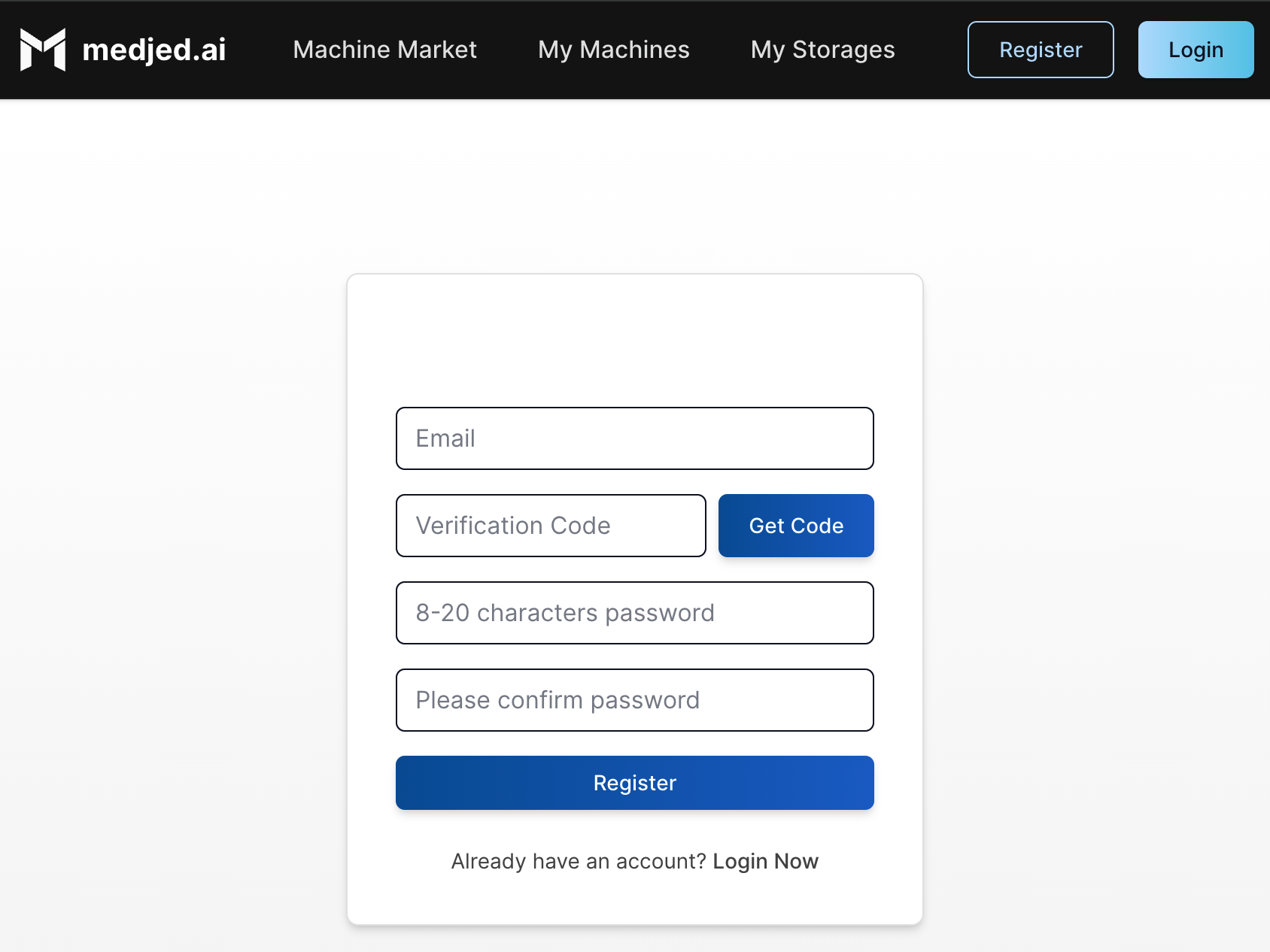
1. Visit [Medjed.ai](https://cloud.medjed.ai/register)
2. Click **Sign Up** and complete the registration process
3. Verify your email address to activate your account
### Add Payment Method
[Section titled “Add Payment Method”](#add-payment-method)
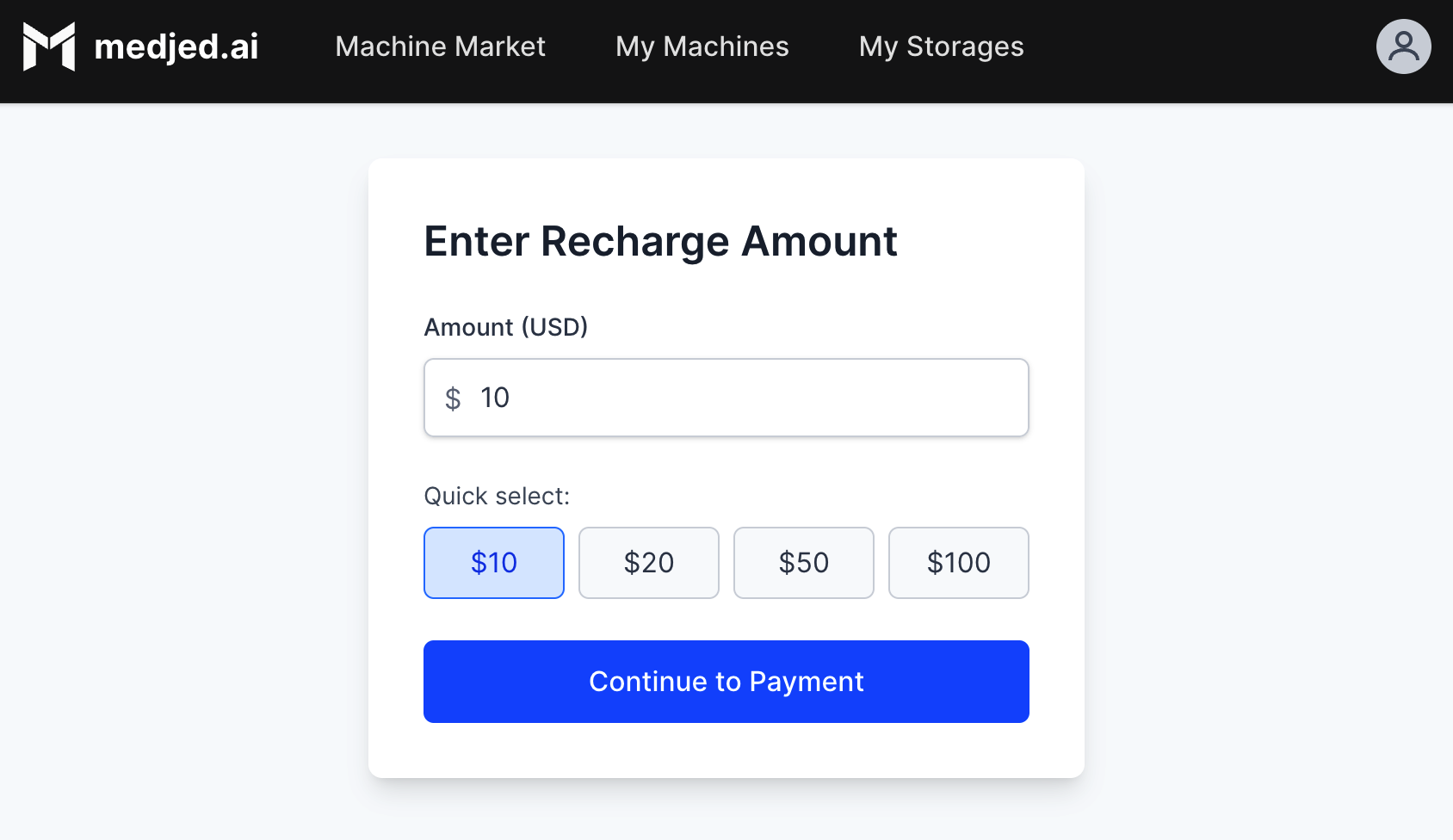
1. Log in to your [Medjed.ai](https://cloud.medjed.ai/login) account
2. Navigate to the **Recharge** section
3. Add a valid credit card or set up USDC cryptocurrency payment
4. Deposit funds to your account (minimum $5.00 recommended)
Tip
You can check your deposit status and current balance in the Balance section. 
## 2. Prepare to Connect
[Section titled “2. Prepare to Connect”](#2-prepare-to-connect)
### Set Up SSH Access
[Section titled “Set Up SSH Access”](#set-up-ssh-access)
1. Generate an SSH key pair on your local machine:
```bash
ssh-keygen -t ed25519 -C "your_email@example.com"
```
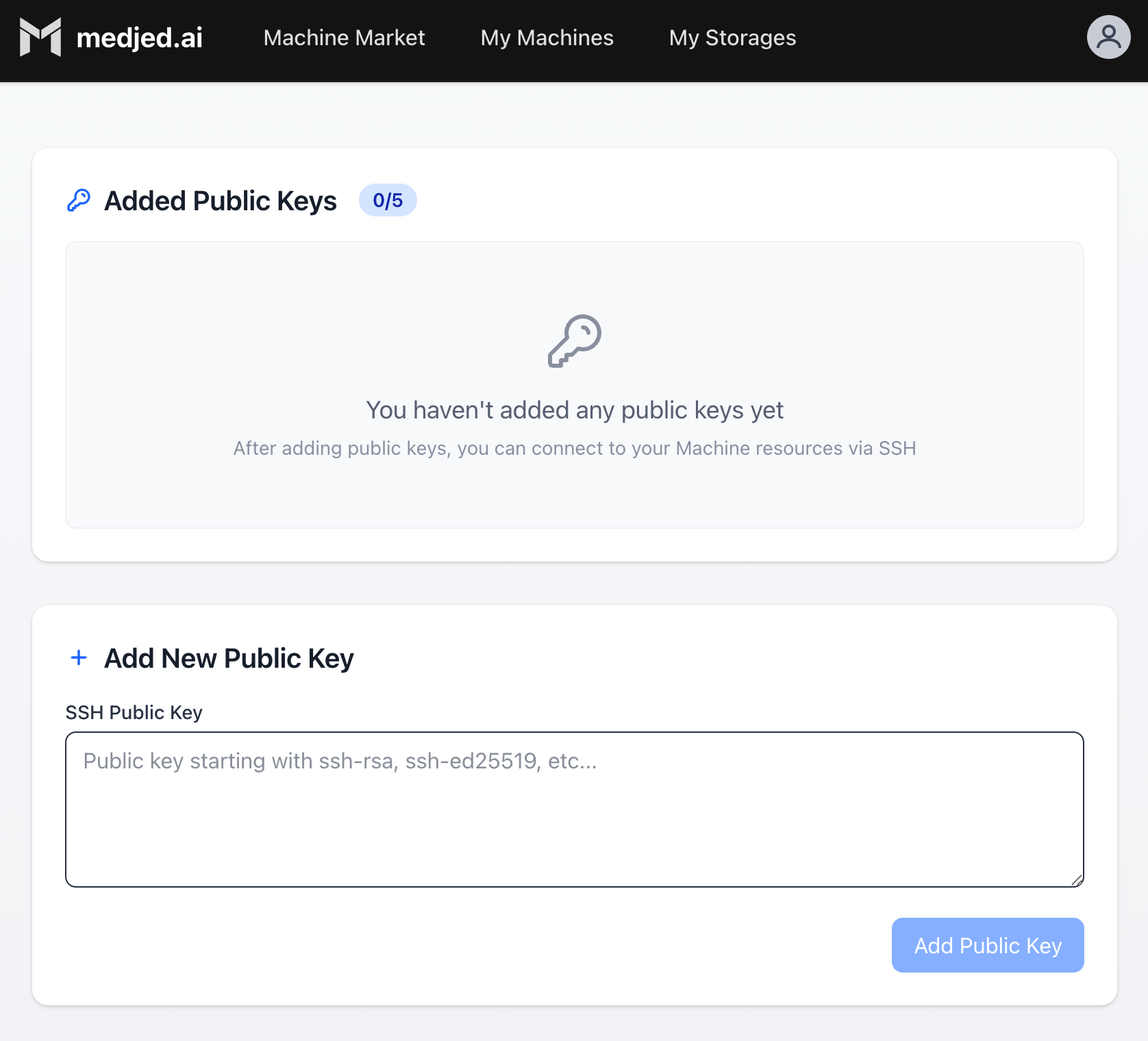
2. Navigate to the **[Public Keys](https://cloud.medjed.ai/public-keys)** page in Medjed.ai
3. Upload your public SSH key (typically `~/.ssh/id_ed25519.pub`)
4. Your SSH key is now configured for accessing instances
## 3. Launch Your First Instance
[Section titled “3. Launch Your First Instance”](#3-launch-your-first-instance)
### Browse the Machine Market
[Section titled “Browse the Machine Market”](#browse-the-machine-market)
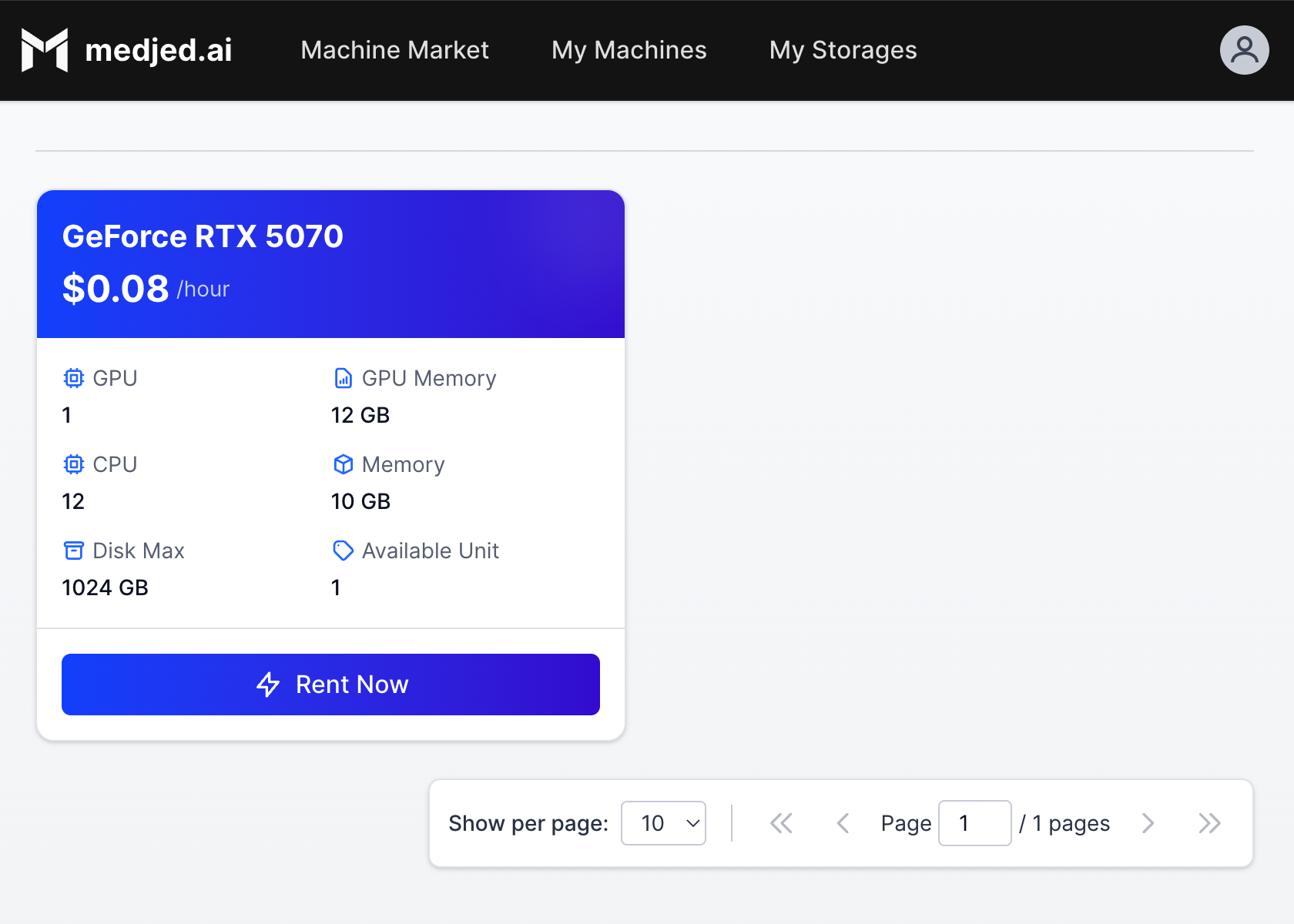
1. From the navigation menu, select **[Machine Market](https://cloud.medjed.ai/machine-market)**
2. Filter machines by:
* GPU type (NVIDIA H200, H100, RTX PRO 6000, etc.)
* GPU count and memory
* CPU cores and RAM
* Price per hour
### Deploy an Instance
[Section titled “Deploy an Instance”](#deploy-an-instance)
1. Click on a machine that meets your requirements
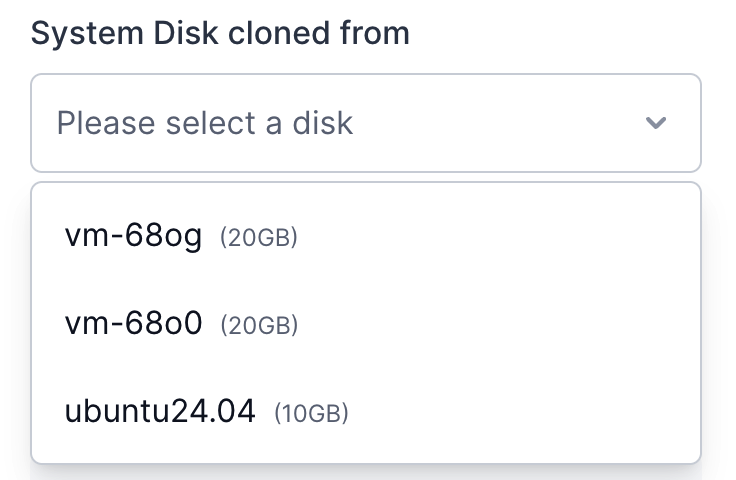
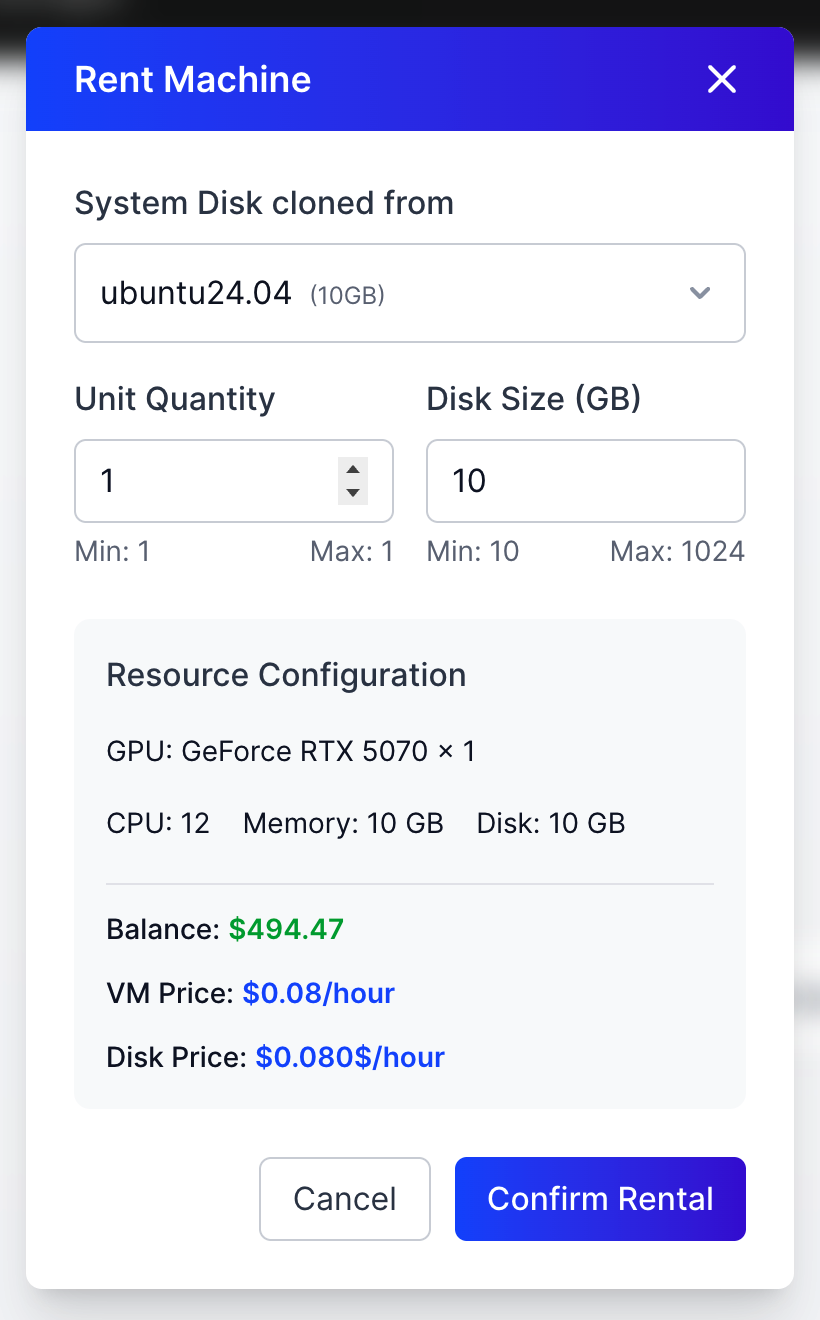
2. From the “System Disk cloned from” dropdown, select either a fresh system image or a previously detached disk in Detached State
3. Configure instance settings:
* Disk size (permanent, cannot be changed later)
* SSH key selection
* Additional environment variables (if needed)
4. Click **Deploy** to launch your instance
5. Instances typically start in approximately 10 milliseconds, with no waiting required
6. Once running, use the **Connect** button to access your instance via SSH
## 4. Manage Your Resources
[Section titled “4. Manage Your Resources”](#4-manage-your-resources)
### Manage Instances
[Section titled “Manage Instances”](#manage-instances)
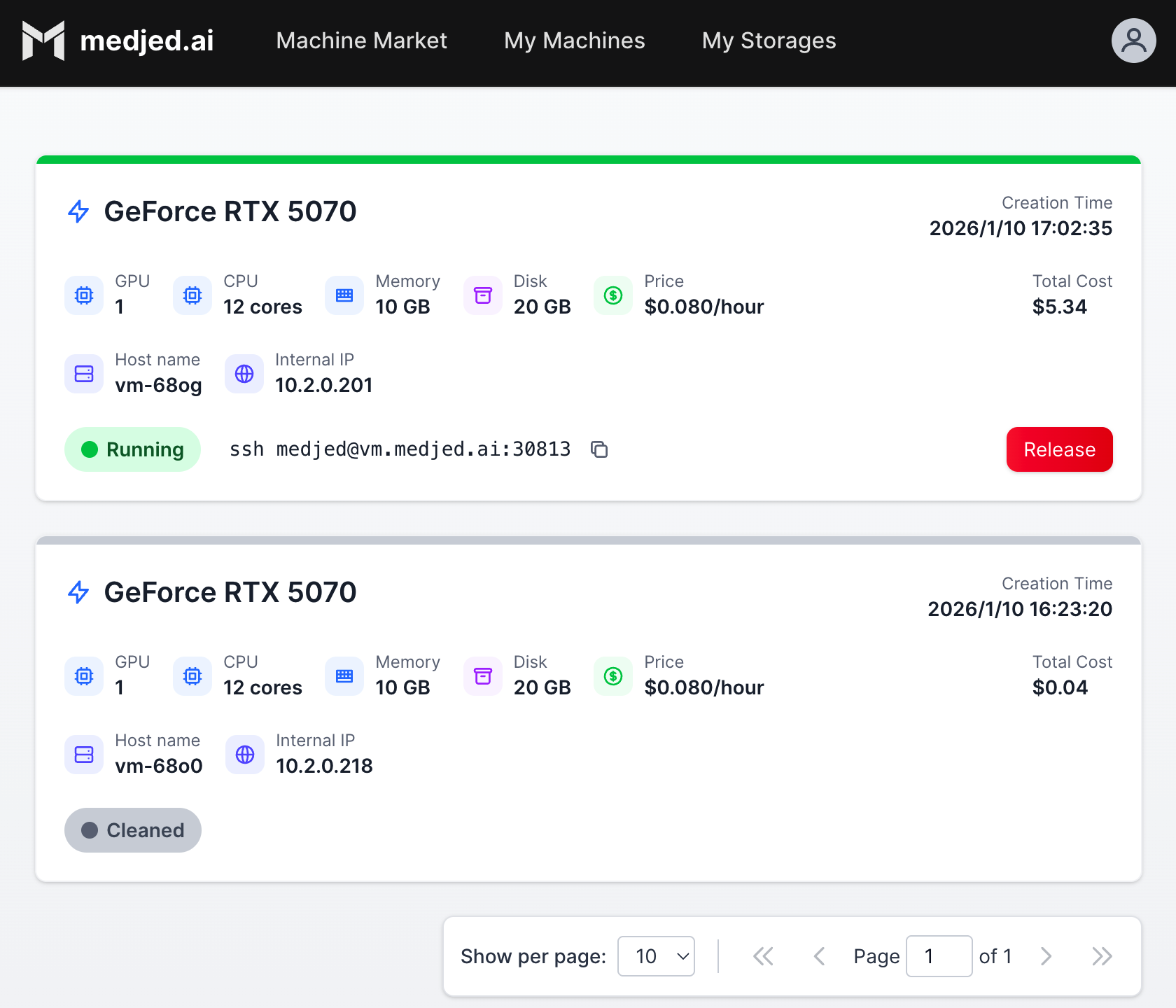
1. Navigate to **[My Machines](https://cloud.medjed.ai/my-machines)** to view all your instances
2. Available actions:
* **Start/Stop**: Pause/resume instance (storage still incurs charges when stopped)
* **Connect**: Access via SSH or Jupyter
* **Edit**: Modify instance settings (limited to certain configurations)
* **Delete**: Permanently remove instance and associated resources
### Manage Storage
[Section titled “Manage Storage”](#manage-storage)
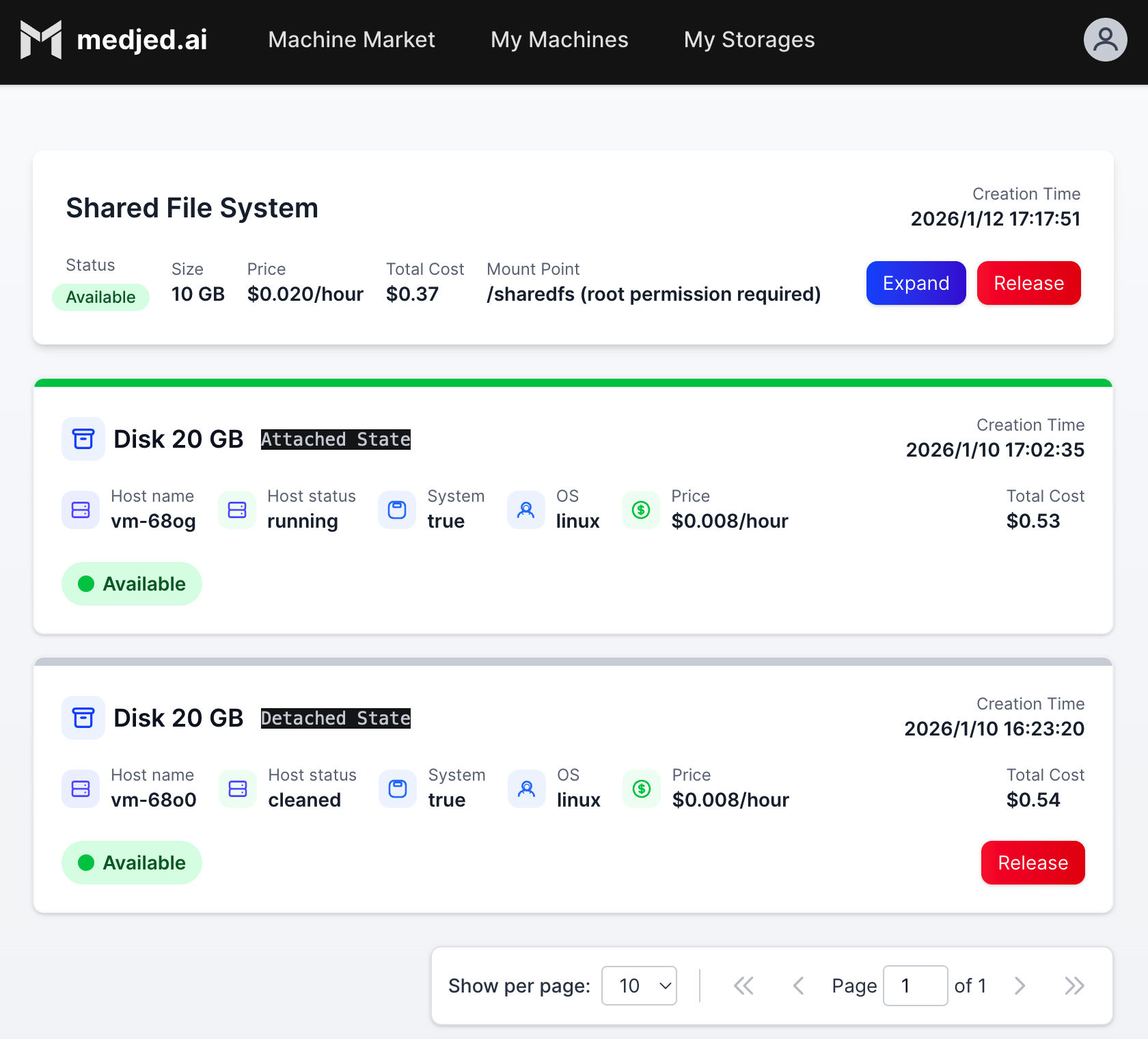
1. Navigate to **[My Storages](https://cloud.medjed.ai/my-storages)** to view all your storage volumes
2. Available actions:
* **Attach**: Connect storage to running instances
* **Detach**: Disconnect storage from instances
* **Release**: Permanently delete storage and stop charges
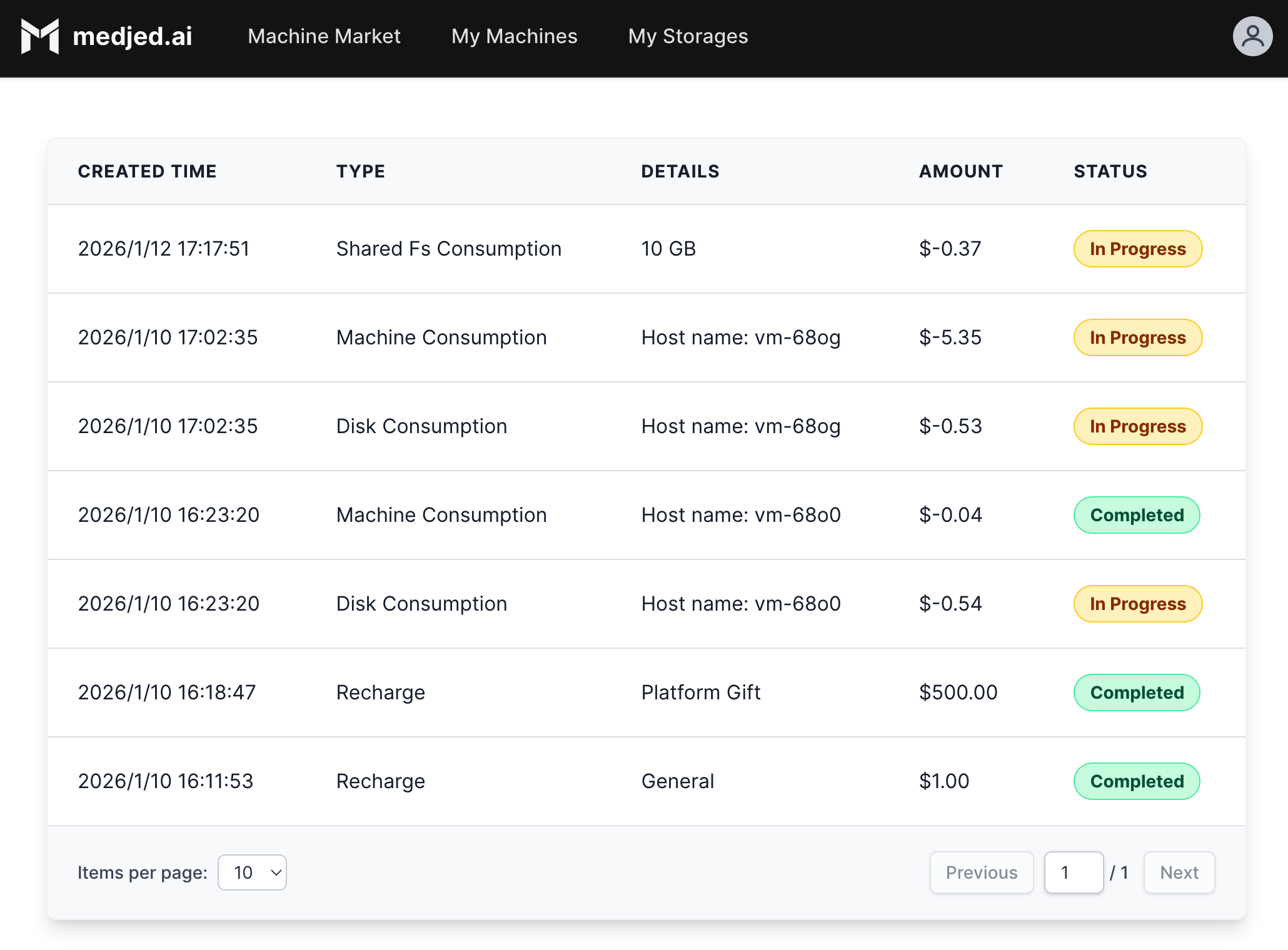
### Important Billing Notes
[Section titled “Important Billing Notes”](#important-billing-notes)
* **Instance Billing**: Charged per hour based on GPU type and resources
* **Storage Billing**: Charged per GB per hour regardless of instance state
* **Auto-stop**: Instances will automatically stop when your balance reaches zero
* **Resource Release**: Always release unused instances and storage to avoid unnecessary charges
## 5. Common Questions
[Section titled “5. Common Questions”](#5-common-questions)
### What is the minimum deposit amount?
[Section titled “What is the minimum deposit amount?”](#what-is-the-minimum-deposit-amount)
The minimum deposit amount varies by payment method. Check the Billing section for current requirements.
### How do I avoid instance interruptions?
[Section titled “How do I avoid instance interruptions?”](#how-do-i-avoid-instance-interruptions)
Enable auto-recharge in the Billing settings to automatically add funds when your balance falls below a threshold.
### Can I change the disk size after deployment?
[Section titled “Can I change the disk size after deployment?”](#can-i-change-the-disk-size-after-deployment)
No, disk size is permanent. Allocate more space than you think you need to avoid interruptions.
### What happens if my balance runs out?
[Section titled “What happens if my balance runs out?”](#what-happens-if-my-balance-runs-out)
Running instances will automatically stop. Storage will continue to accrue charges until released.
## 6. Next Steps
[Section titled “6. Next Steps”](#6-next-steps)
* **Explore Templates**: Browse available templates for different AI frameworks and applications
* **Learn SSH Commands**: Familiarize yourself with basic SSH commands for instance management
* **Set Up Monitoring**: Configure alerts for instance performance and billing
* **Explore Advanced Features**: Learn about custom templates, shared storage, and API access
* **Read the Documentation**: Check out our [VMs documentation](/vms/) for more detailed information
## Support
[Section titled “Support”](#support)
If you encounter any issues, please contact our support team through the Medjed.ai dashboard or email us at .
# AI Tooling
> Learn about the AI tools available for working with our documentation and services.
## llms.txt
[Section titled “llms.txt”](#llmstxt)
We have implemented `llms.txt`, `llms-small.txt`, and `llms-full.txt`, and also created per-page Markdown links as follows:
* [`llms.txt`](/llms.txt) - Condensed overview of our documentation
* [`llms-small.txt`](/llms-small.txt) - Detailed overview for LLMs with medium context windows
* [`llms-full.txt`](/llms-full.txt) - Complete documentation for comprehensive access
### Custom Documentation Sets
[Section titled “Custom Documentation Sets”](#custom-documentation-sets)
We’ve created custom documentation sets to help you access specific sections of our docs:
* **Bare Metal GPUs Documentation**: `/bare-metal-gpus/llms-full.txt` - Complete documentation for our bare metal GPU services
* **Instances Documentation**: `/instances/llms-full.txt` - Documentation for our AI instances
* **API Reference**: `/api-reference/llms-full.txt` - Complete API reference
* **Guides and Tutorials**: `/guides/llms-full.txt` - Step-by-step guides and tutorials
* **Reference Documentation**: `/reference/llms-full.txt` - General reference documentation
## Managed MCP Servers
[Section titled “Managed MCP Servers”](#managed-mcp-servers)
We run a catalog of managed remote MCP Servers that you can connect to using OAuth on various clients:
* Cursor
To install in Cursor, use this [Direct install link](cursor://anysphere.cursor-deeplink/mcp/install?name=Medjed.ai%20Documentation\&config=eyJuYW1lIjoiTWVkamVkLmFpIERvY3VtZW50YXRpb24iLCJ1cmwiOiJodHRwczovL2RvY3MubWVkamVkLmFpL21jcC5qc29uIn0=).
* VSCode
To install in VSCode, use this [Direct install link](vscode:mcp/install?%7B%22name%22%3A%22Medjed%20MCP%20Documentation%22%2C%22url%22%3A%22https%3A%2F%2Fdocs.medjed.ai%2Fmcp.json%22%7D).
* Manually
To install manually, add the following specification to your MCP config:
```json
{
"server": {
"name": "Medjed AI Documentation",
"version": "1.0.0",
"transport": "http"
},
"capabilities": {
"tools": {
"SearchMedjedAiDocumentation": {
"name": "SearchMedjedAiDocumentation",
"description": "Search across the Medjed AI Documentation knowledge base to find relevant information, code examples, API references, and guides. Use this tool when you need to answer questions about Medjed AI Documentation, find specific documentation, understand how features work, or locate implementation details. The search returns contextual content with titles and direct links to the documentation pages.",
"inputSchema": {
"type": "object",
"properties": {
"query": {
"type": "string",
"description": "A query to search the content with."
}
},
"required": [
"query"
]
},
"operationId": "StarlightSearch"
}
},
"resources": [],
"prompts": []
}
}
```
These servers provide secure access to our AI services and documentation, allowing you to integrate our offerings with your preferred AI workflows.
# Billing information
> Comprehensive guide to pay-as-you-go billing, payments, and invoicing for Medjed AI services.
## Billing Cycle
[Section titled “Billing Cycle”](#billing-cycle)
Medjed AI uses a pay-as-you-go billing model. You are charged for resources based on actual usage, with no fixed monthly commitments.
## Payment Methods
[Section titled “Payment Methods”](#payment-methods)
We accept the following payment methods through Stripe:
* Credit Cards (Visa, Mastercard, American Express)
* Bank Transfers (for enterprise customers)
* USDC (USD Coin) cryptocurrency recharge
If you need to recharge using other cryptocurrencies, please contact our administrators for assistance.
## Cost Calculation
[Section titled “Cost Calculation”](#cost-calculation)
### Instance Usage
[Section titled “Instance Usage”](#instance-usage)
* **CPU Instances**: Charged per hour based on CPU cores and memory allocated
* **GPU Instances**: Charged per hour based on GPU model and memory
* **Storage**: Charged per GB per month for both persistent and temporary storage
* **Network Usage**: Charged per GB for outgoing traffic (incoming traffic is free)
## Invoices
[Section titled “Invoices”](#invoices)
* Invoices are generated automatically based on your usage: daily for high-volume users, weekly for standard users, or monthly for low-volume users
* Invoices include detailed breakdown of all charges by resource type and usage period
* Invoices can be accessed from your account dashboard
* Invoice PDF downloads are available for record-keeping
## Refund Policy
[Section titled “Refund Policy”](#refund-policy)
* **Instances**: No refunds for unused hours once an instance has been provisioned
* **Storage**: Refunds available for unused storage space within 7 days of cancellation
* **Support Plans**: Pro-rated refunds available for unused support periods
* **API Usage**: No refunds for API requests already processed
## Tax Information
[Section titled “Tax Information”](#tax-information)
* Taxes are calculated based on your billing address
* Tax rates vary by jurisdiction
* VAT IDs are accepted for business customers
## Billing Support
[Section titled “Billing Support”](#billing-support)
If you have any questions about your bill, please contact our support team at:
* Email:
* Support Portal: [Medjed AI Support](https://support.medjed.ai)
# FAQ
> A reference page in my new Starlight docs site.
Reference pages are ideal for outlining how things work in terse and clear terms. Less concerned with telling a story or addressing a specific use case, they should give a comprehensive outline of what you’re documenting.
## Further reading
[Section titled “Further reading”](#further-reading)
# Referral Programs
> Learn about Medjed AI's referral program and how to earn rewards by inviting friends.
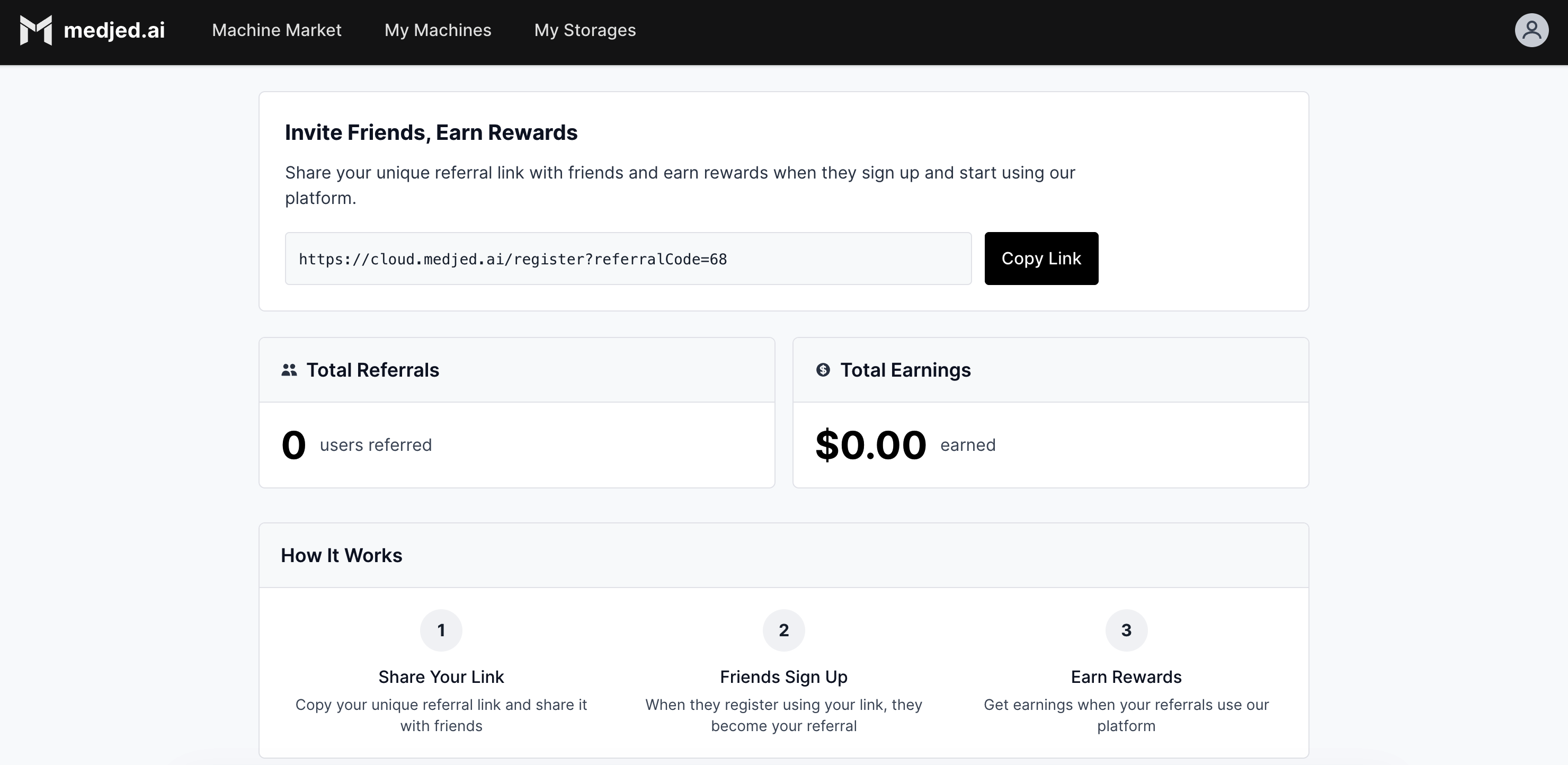
The Medjed AI Referral Program enables you to earn rewards by referring new users to the Medjed AI platform. When your referrals sign up and utilize Medjed AI services, you receive earnings based on their usage patterns.
## How the Referral Program Works
[Section titled “How the Referral Program Works”](#how-the-referral-program-works)
The Medjed AI Referral Program follows a simple three-step process:
1. **Obtain Your Link**: Log in to your account, navigate to the referral dashboard, and copy your unique referral link.
2. **Share Your Link**: Distribute the link to potential users through email, social media, or professional networks.
3. **Earn Rewards**: When users sign up using your link and use Medjed AI services, you earn rewards based on their usage.
## Referral Dashboard
[Section titled “Referral Dashboard”](#referral-dashboard)
The referral dashboard is your central hub for managing referral activities. To access it:
1. Log in to your Medjed AI account
2. From the main menu, select **My Account** > [**Referral Program**](https://cloud.medjed.ai/referrals)
### Key Dashboard Features
[Section titled “Key Dashboard Features”](#key-dashboard-features)
* **Unique Referral Link**: Personalized link that tracks all your referrals
* **Real-Time Metrics**: View total referrals, earnings, conversion rate, and earnings history
* **One-Click Sharing**: Copy your link or share directly to social media
## Getting Started
[Section titled “Getting Started”](#getting-started)
### Prerequisites
[Section titled “Prerequisites”](#prerequisites)
* Active Medjed AI account
* Valid payment method (required for receiving rewards)
### Quick Start Steps
[Section titled “Quick Start Steps”](#quick-start-steps)
1. **Enroll**: Navigate to the referral dashboard and accept the program terms.
2. **Share**: Copy your unique referral link and distribute it to potential users.
3. **Earn**: Monitor your dashboard for new sign-ups and accumulated earnings.
4. **Redeem**: When ready, withdraw your earnings from the **Rewards** section.
## Program Rules
[Section titled “Program Rules”](#program-rules)
* **Eligible Referrals**: New users who sign up using your unique link and maintain an active account
* **Reward Calculation**: Based on referral usage, with rates varying by service type
* **Payment Options**: Redeem as account credits or through supported payment methods (minimum thresholds may apply)
# Storage Overview
> Learn about Medjed AI storage options, including Disk and SharedFS, their states, and billing implications.
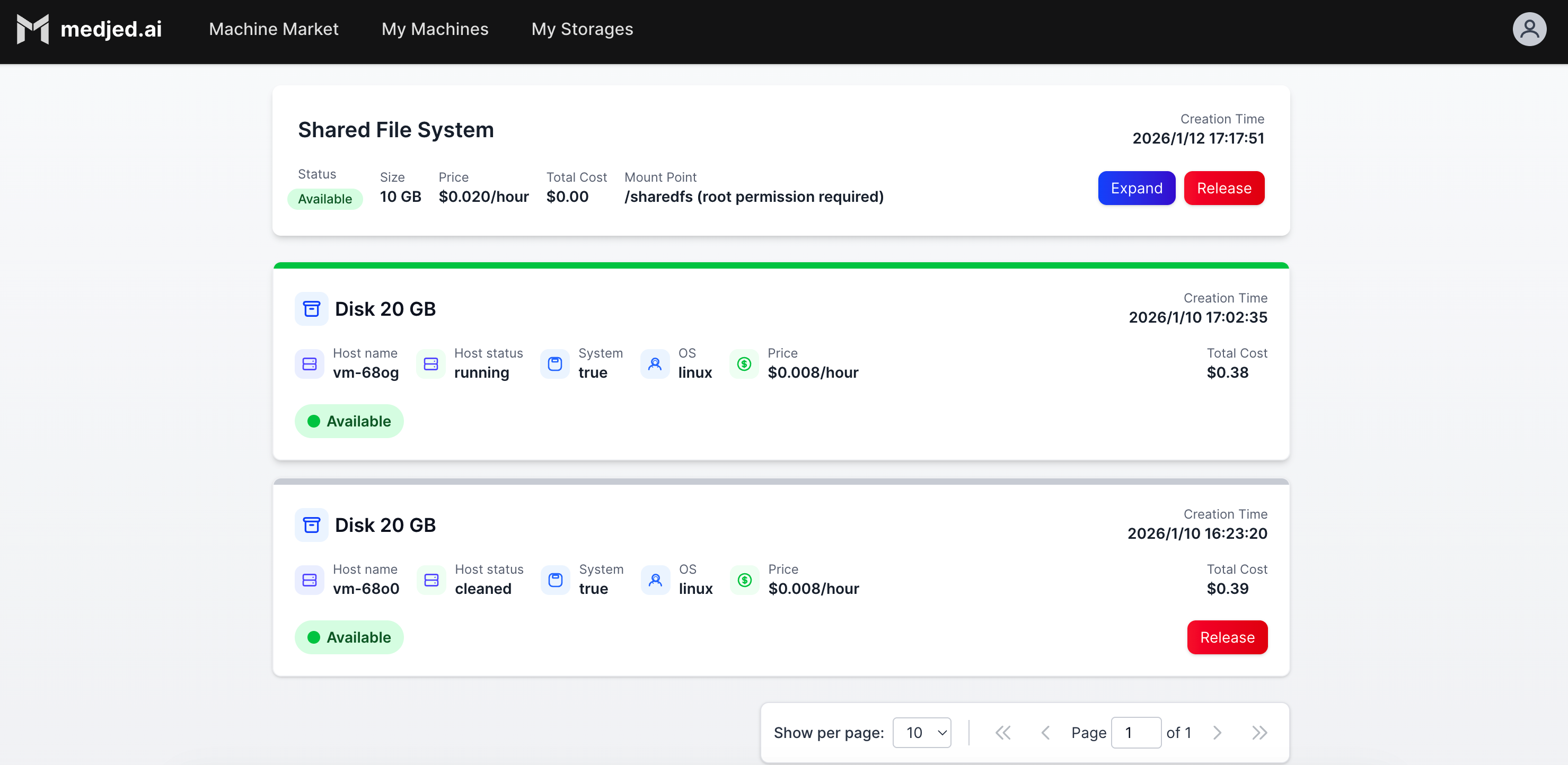
Medjed AI provides two primary storage options for your compute instances: **Disk** and **SharedFS**. This guide explains the features, use cases, and billing implications of each storage type.
## Storage Types
[Section titled “Storage Types”](#storage-types)
### Disk
[Section titled “Disk”](#disk)
Disk storage provides persistent block storage for your GPU instances. When you provision a GPU instance, you can attach a disk that persists independently of the instance state.
#### Disk States
[Section titled “Disk States”](#disk-states)
Disks have two primary states:
1. **Attached State**
* When the associated GPU instance is running
* Storage is available for immediate use by the instance
* Billed at the standard disk storage rate
2. **Detached State**
* When the associated GPU instance is released
* Storage remains persistent and retains all data
* Continues to be billed at the standard disk storage rate
* Content can be migrated to new GPU instances
#### Important Billing Note
[Section titled “Important Billing Note”](#important-billing-note)
* When you release a GPU instance, you have the option to release the associated disk simultaneously
* If you **do not** release the disk during instance release, the disk enters the detached state and **continues to incur charges**
* To stop disk charges, you must explicitly release the disk from the Storage Management page
#### Disk Benefits
[Section titled “Disk Benefits”](#disk-benefits)
* **Persistent Data**: All system configurations, installed software, and data are retained when the disk is detached
* **Fast Reattachment**: Quickly reattach existing disks to new GPU instances, eliminating setup time
* **Cost Efficiency**: Reuse existing disks with pre-configured environments instead of recreating them
* **Data Security**: Retain critical data independently of instance lifecycles
### SharedFS
[Section titled “SharedFS”](#sharedfs)
SharedFS provides network-attached shared storage that can be accessed by multiple GPU instances simultaneously. This is ideal for collaborative workflows or when you need to share large datasets across instances.
Caution
You must detach the SharedFS volume from all running GPU instances before it can be released.
#### Key Features
[Section titled “Key Features”](#key-features)
* **Multi-instance Access**: Share data across multiple GPU instances
* **High Performance**: Optimized for large file transfers and parallel access
* **Scalable Capacity**: Adjust storage capacity based on your needs
* **Centralized Management**: Manage all shared storage from a single interface
## Storage Billing
[Section titled “Storage Billing”](#storage-billing)
| Storage Type | Billing Model | Notes |
| ------------ | --------------- | ----------------------------------------------------------- |
| Disk | Per GB per hour | Charged regardless of instance state (attached or detached) |
| SharedFS | Per GB per hour | Charged based on total provisioned capacity |
## Getting Started with Storage
[Section titled “Getting Started with Storage”](#getting-started-with-storage)
### Provisioning Storage
[Section titled “Provisioning Storage”](#provisioning-storage)
1. **Disk Storage**: Automatically provisioned when you create a GPU instance
2. **SharedFS**: Provision separately from the Storage Management page
### Managing Storage
[Section titled “Managing Storage”](#managing-storage)
* **View Storage**: Access the Storage Management page to view all your disks and SharedFS volumes
* **Release Disk**: Select the disk and click “Release” to stop billing for detached disks
* **Attach Disk**: Select an existing disk when creating a new GPU instance
## Best Practices
[Section titled “Best Practices”](#best-practices)
* **Release Unused Disks**: Always release disks you no longer need to avoid unnecessary charges
* **Use SharedFS for Collaboration**: Share data across teams using SharedFS instead of duplicating data on multiple disks
* **Backup Critical Data**: Regularly backup important data from disks to external storage
* **Size Storage Appropriately**: Provision only the storage capacity you need to optimize costs
## Storage Limits
[Section titled “Storage Limits”](#storage-limits)
| Storage Type | Default Limit | Maximum Limit |
| ------------------------- | ------------- | -------------------- |
| Disks per User | 10 | 100 (with request) |
| SharedFS Volumes per User | 5 | 20 (with request) |
| Maximum Disk Size | 10TB | 100TB (with request) |
| Maximum SharedFS Size | 50TB | 500TB (with request) |
## Troubleshooting
[Section titled “Troubleshooting”](#troubleshooting)
### Cannot Attach Disk to Instance
[Section titled “Cannot Attach Disk to Instance”](#cannot-attach-disk-to-instance)
* **Issue**: Error when attaching a disk to a new GPU instance
* **Possible Causes**:
* Disk is already attached to another instance
* Instance type does not support the disk size
* Disk is in a failed state
* **Solution**: Verify the disk status and compatibility with your instance type
### Unexpected Storage Charges
[Section titled “Unexpected Storage Charges”](#unexpected-storage-charges)
* **Issue**: Charges for disks you thought were released
* **Possible Causes**:
* Disk was not released when the GPU instance was released
* Multiple disks are provisioned under your account
* **Solution**: Review the Storage Management page to identify and release unused disks
# GPU Virtual Machines
> Learn about Medjed AI GPU Virtual Machines (VMs), including features, specifications, use cases, and best practices for AI/ML workloads.
Medjed AI GPU Virtual Machines (VMs) provide high-performance computing resources with NVIDIA GPUs for accelerating AI/ML workloads, scientific computing, and data processing tasks. Our GPU VMs offer scalable, on-demand access to NVIDIA GPUs, enabling you to accelerate computationally intensive workloads by 10x to 100x compared to CPU-only systems.
### Key Benefits
[Section titled “Key Benefits”](#key-benefits)
| Benefit | Description |
| --------------------------- | ------------------------------------------------------------- |
| **Exceptional Performance** | Accelerate AI/ML workloads with NVIDIA’s latest GPUs |
| **Flexible Scaling** | Choose from 1 to 8 GPUs per instance |
| **Fast Deployment** | Launch GPU VMs in approximately 10 milliseconds |
| **Cost-Effective** | Pay-as-you-go pricing with no long-term commitments |
| **Secure Isolation** | Isolated virtual environments with built-in security features |
| **Easy Management** | User-friendly dashboard for VM provisioning and monitoring |
## GPU Types and Specifications
[Section titled “GPU Types and Specifications”](#gpu-types-and-specifications)
Medjed AI offers a range of NVIDIA GPUs to meet different workload requirements:
| GPU Model | GPU Memory | Typical Use Cases | Performance Profile |
| ---------------- | -------------- | ---------------------------------------------------- | -------------------------------------------------------- |
| NVIDIA H100 | 80GB HBM3 | Large-scale AI training, deep learning inference | Highest performance for AI/ML workloads |
| NVIDIA A100 | 40GB/80GB SXM4 | AI/ML training, scientific computing, data analytics | Industry-standard for enterprise AI workloads |
| NVIDIA L40S | 48GB GDDR6 | AI content creation, graphics rendering, inference | Optimized for AI visualization and content generation |
| NVIDIA RTX A6000 | 48GB GDDR6 | Professional visualization, rendering, AI research | High-performance GPU for creative and research workloads |
## Architecture
[Section titled “Architecture”](#architecture)
Each Medjed AI GPU VM consists of NVIDIA GPU(s), CPU, system memory, NVMe SSD storage, and a high-bandwidth network interface. VMs feature:
* **Virtual Network Interface**: Dedicated for each VM with up to 100 Gbps bandwidth
* **Storage Options**: NVMe SSD boot disk, additional data disks, and optional shared storage
## Use Cases
[Section titled “Use Cases”](#use-cases)
Medjed AI GPU VMs are ideal for:
* **AI/ML Training**: Train deep learning models faster with GPU acceleration
* **Inference**: Deploy and run AI models with low latency
* **Scientific Computing**: Accelerate complex simulations and calculations
* **Data Analytics**: Process large datasets with GPU-accelerated frameworks
* **AI Content Creation**: Generate AI-powered content and graphics
## Getting Started
[Section titled “Getting Started”](#getting-started)
To get started with Medjed AI GPU VMs:
1. **Evaluate Requirements**: Determine the GPU type, memory, and resources needed for your workload
2. **Configure & Deploy**: Use the Medjed AI dashboard to provision your GPU VM
3. **Connect**: Access your VM via SSH and verify GPU availability with `nvidia-smi`
4. **Install Frameworks**: Set up your preferred AI frameworks (PyTorch, TensorFlow, etc.)
For detailed instructions, see our [QuickStart Guide](../guides/quickstart.mdx).
## Best Practices
[Section titled “Best Practices”](#best-practices)
### GPU Selection
[Section titled “GPU Selection”](#gpu-selection)
* Match GPU model and memory to workload requirements
* Evaluate performance-to-cost ratio
### Cost Optimization
[Section titled “Cost Optimization”](#cost-optimization)
* Right-size instances to avoid over-provisioning
* Release unused VMs and storage to stop charges
* Monitor usage to optimize allocation
### Performance Optimization
[Section titled “Performance Optimization”](#performance-optimization)
* Use GPU-optimized frameworks and libraries
* Optimize batch sizes for efficient GPU memory usage
* Implement fast data loading techniques
* Consider distributed training for large models
### Security
[Section titled “Security”](#security)
* Use SSH keys for secure access
* Configure firewalls to restrict network access
* Encrypt sensitive data at rest and in transit
* Keep OS and applications updated
## Troubleshooting
[Section titled “Troubleshooting”](#troubleshooting)
### Common Issues
[Section titled “Common Issues”](#common-issues)
| Issue | Resolution |
| ------------------- | ----------------------------------------------- |
| GPU Not Detected | Verify GPU drivers with `nvidia-smi` |
| Low GPU Utilization | Optimize workload and batch processing |
| Memory Errors | Reduce batch size or use a GPU with more memory |
| Network Issues | Check firewall and network settings |
## Next Steps
[Section titled “Next Steps”](#next-steps)
* [GPU VM Pricing](pricing): Review pricing models and costs
* [Choosing the Right GPU](choosing-vms): Guidance on selecting GPUs for your workload
* [Connecting to GPU VMs](connecting-to-vms): Detailed access instructions
* [Support Portal](https://cloud.medjed.ai/support): Get assistance from our team
***
*Last updated: 2026-01-13*
# Example Reference
> A reference page in my new Starlight docs site.
Reference pages are ideal for outlining how things work in terse and clear terms. Less concerned with telling a story or addressing a specific use case, they should give a comprehensive outline of what you’re documenting.
## Further reading
[Section titled “Further reading”](#further-reading)
# FAQ
> A reference page in my new Starlight docs site.
Reference pages are ideal for outlining how things work in terse and clear terms. Less concerned with telling a story or addressing a specific use case, they should give a comprehensive outline of what you’re documenting.
## Further reading
[Section titled “Further reading”](#further-reading)
# Glossary
> A reference page in my new Starlight docs site.
Reference pages are ideal for outlining how things work in terse and clear terms. Less concerned with telling a story or addressing a specific use case, they should give a comprehensive outline of what you’re documenting.
## Further reading
[Section titled “Further reading”](#further-reading)
# GPU VMs Pricing
> Learn about Medjed AI GPU Virtual Machines pricing, including models, rates, and cost optimization strategies.
Medjed AI GPU VMs use a transparent, pay-as-you-go pricing model with all prices displayed in real-time on the [Machine Market](https://cloud.medjed.ai/machine-market) page.
## Pricing Components
[Section titled “Pricing Components”](#pricing-components)
Your GPU VM cost includes two components:
* **GPU Cost**: Based on GPU model and quantity
* **Storage Cost**: Based on storage capacity
## Check Real-Time Prices
[Section titled “Check Real-Time Prices”](#check-real-time-prices)
For the latest pricing, visit the [Machine Market](https://cloud.medjed.ai/machine-market) where you can:
* View current prices for all GPU models
* Filter by GPU type and specifications
* Compare prices across configurations
* Sort by price to find the best deal
## Important Pricing Notes
[Section titled “Important Pricing Notes”](#important-pricing-notes)
* **Billing Increments**: VMs are billed by the hour; partial hours round up
* **Storage Billing**: Charged per GB per hour, even when VMs are stopped
* **Automatic Shutdown**: Instances shut down when your balance reaches zero
* **Auto-Recharge**: Enable to avoid unexpected shutdowns
## Cost Optimization Tips
[Section titled “Cost Optimization Tips”](#cost-optimization-tips)
* Release unused storage volumes to stop storage charges
* Only provision the storage capacity you need
* Regularly check usage and adjust resources as needed
## Need Help?
[Section titled “Need Help?”](#need-help)
* **Pricing Questions**:
* **Billing Support**: [Support Portal](https://cloud.medjed.ai/support)
## Related Docs
[Section titled “Related Docs”](#related-docs)
* [GPU VMs Overview](index)
* [Choosing the Right GPU](choosing-vms)
***
*Last updated: 2026-01-13*
*Note: All prices are subject to change. For current pricing, refer to the [Machine Market](https://cloud.medjed.ai/machine-market).*
# SSH Connection
> A guide in my new Starlight docs site.
Guides lead a user through a specific task they want to accomplish, often with a sequence of steps. Writing a good guide requires thinking about what your users are trying to do.
## Further reading
[Section titled “Further reading”](#further-reading)